Abandon All Hope, Ye Who Want to Comment
I’m begging you, please just make a comment to make me feel better. #
When I started this blog, like, a week ago, I chose to take the simplest route for implementing a comment system, which is Disqus. You just gotta stick a comments: true in the front matter of the post and cram their cheeky little UNIVERSAL EMBED CODE at the end of your post template. Certainly not rocket science (not to mention there is a free tier, and I’m a miserly cad who ain’t gonna pay for nothing), so for the purposes of quickly building and launching a blog, not too bad, right?
SPOILER: there is a caveat. #
Of course, a company’s gotta pay their employees somehow - so how does Disqus do it? Well, the same way every other internet-services company does - serving ads. In between the comments, within the comments, in the Recommendations (I don’t even know what this is) - looking at their sample gives a good idea of the type of saturation you’ll be dealing with:
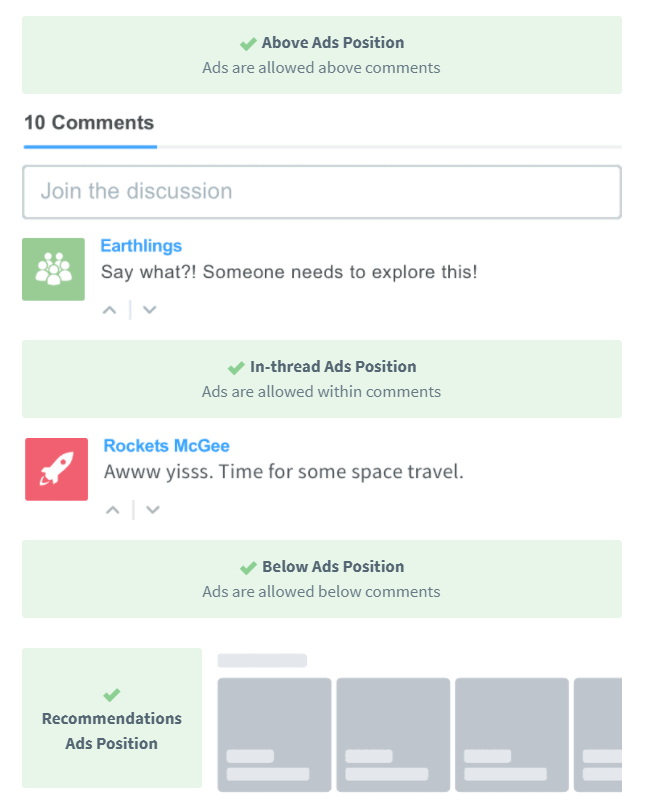
I can’t speak for anybody else, but a blog that bombards you with ads is, best case scenario, an absolute sensory overload, and worst case scenario, frustrating to the point of driving me away from the site. Now, it may be a bit of an exaggeration to call what Disqus would do “bombardment”, but I’ve just had a thing recently where I just can’t stand the feeling of being sold to. Ever since I set up a pihole on my apartment’s network for my Raspberry Pi class back in college, I’ve lost tolerance for advertisements, and it has progressed to a point where, if at any point I feel like a piece of media is trying to convince me to spend money for any reason, I get angry.
For these reasons, paired with my determination to not spend any money on this site (you can pay Disqus to not serve ads) and the fact that I was too lazy to research other “plug-and-play”-type solutions for implementing comments, I determined to go the route of an alternate solution I had encountered that piqued my interest: Staticman.
The elevator pitch for Staticman is that it enables one to implement user-generated content in the context of a static site without having to think about heavier-duty things like databases and back-end code (neither of which play well with Github Pages). It’s a fantastic solution for this, a Jekyll-based Github pages blog that I want to implement native comments on, at least in theory.
SPOILER #2: this was much harder than I thought it would be. #
I thought: “I’ve found a few tutorials, this has been done before, surely it can’t be that hard to implement!” Famous last words. An insight that I’m having in this moment: software developers have really lame last words.
I’ll spare the internet the indignity of adding to the 10 bazillion tutorials for implementing Staticman comments - it has been pretty extensively covered and frankly, done more justice already than I would be capable of - but I will regale some of the most entertaining things that tripped me up for embarassing amounts of time so perhaps you, unlike me, will be prepared to suffer if you choose to undertake this journey, or better, can mitigate the worst of the tedium. Or, if you aren’t a masochist, you can simply sit back and watch the steam trail off the top of a hot mug of Schadenfreude.
Maybe don’t use the “deploy to Heroku” button #
Compared to the next two items this ended up being a fairly minor issue, but that doesn’t mean it didn’t still take yet another inch off my already-receding hairline.
For context, when Staticman was first released, you’d just send off your user-generated-content™ to their servers, and they worried about the actual maintenance of the app. But apparently they grossly underestimated the amount of people who were interested in using it, and their servers got slamborini’d so they said, “hey, y’all gonna have to host the app yourself now.” Ultimately this results in a greater level of control over what Staticman does and how it does it, so this does work in our favor as users, but that’s beside the point. People who want to use Staticman are thusly left with 2 options: either they can host it on their own servers (dumb, who wants to deal with maintaining an always-on physical server or some sort of AWS/Azure/Google/insert-preferred-cloud-services-provider bologna for something this lightweight), or they can use a service like Heroku.
As an aside, if you’re considering going down a blog-type path, you can just go ahead and expect to have to make about 5 million new accounts, some of which want a payment method and everything. Just since I started this blog, I have created:
- 2 Github accounts,
- 3 new email addresses
- a since-deleted Disqus account,
- an Akismet account (I don’t even know if this works),
- a since-deleted Wordpress account (related to Akismet, probably not needed),
- a Google Domains account,
- a Mailgun account, and
- a Heroku account
I may have missed a few. It’s a lot.
Anyways, I obviously chose to host Staticman on Heroku. The tutorial I was following just said to use their nifty “deploy to Heroku” in the readme of the github repo, which I did - I would learn that this disallowed me from pulling my specific implementation of Staticman down from Heroku, and therefore, I couldn’t make any changes to its code. For a lot of people this probably doesn’t matter, but I was of the opinion that their email template and the “name” of the sender were, uh, not to my liking.
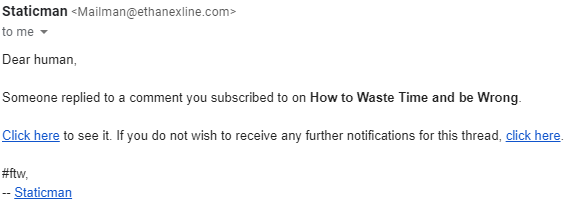
So I had to get into that code and change that template. But how am I to do that if I can’t pull down my version of the app from Heroku?? 😨
I ended up just pulling down a fresh copy of Staticman from the Github repo directly to my computer, making the changes and, fearfully, overwriting the version on my Heroku instance with this version. “Did I break it?” “What will I have to reconfigure?” “How much work did I just lose??”
SPOILER #3: Nothing. #
I clearly overestimated how much I had changed about my Staticman instance since deploying to Heroku. I literally didn’t lose anything. But it was scary!
Trying to avoid making a dark joke about MailGun #
One real nice thing as regards implementing Staticman as a comments solution is that it has MailGun integration built in - that is to say, if you want to let commenters subscribe to a thread of comments so they recieve a custom email from your domain when somebody replies to a certain comment, they make it easy by doing all the heavy lifting of automatically creating email groups and sending junk out correctly via the usage of a preconfigured MailGun account.
While this is nice and convenient, you better hope you still remember basic stuff about DNS from that 1 networking class you took at community college, cause setting up Mailgun to send out emails from a custom domain that don’t get swallowed up by spam filters is a multilayered process that demands that you set up a ton of custom records with your domain provider so that it passes MailGun’s test suite and test the “spaminess” of your emails and change the contents and records some more so people actually receive and see your emails. However, none of these was a huge impediment for me; no, Ethan goes out of his way to have problems with the simplest parts of processes instead. I glided through the process and came to an abrupt stop at the very end where MailGun wanted me to run a test email, using any old bash terminal and the cURL command.
Let the record show, I am comfortable with bash terminals and Linux-y file system navigation and in my Linux class in college I think I literally got a 100.
I couldn’t get that dumb cURL script to work in the Git terminal to save my dang life.
Now, mind you, the way they presented it was wack. For some unknown reason they give you this little code editing window with a generic version of the script that isn’t prepopulated with the specifics of your MailGun implementation and basically say “fix this script up with your stuff and go buck wild.” Like, I’m paraphrasing but that is a faithful representation of how useful their instructions were. The two vital pieces of information I was missing were
- that the way they had formatted it was extremely specific and the idea was that you’re supposed to copy/paste that script without changing the layout, and
- the way that
cURLactually works as a command.
It took me probably 4 or 5 hours to figure this out. The only feedback I got every time I ran the command was a useless 301 error and the fact that the emails didn’t ever arrive and MailGun had no record of delivering everything. Eventually I did what was intended, but not before making several inappropriately-named email accounts with different providers, seething with quiet consternation at my desk, and developing a rash.
ReCaptcha Styling, or The Least Cool Path to a Nervous Breakdown #
I spent literal days trying to figure this bit out. Somehow, longer any other individual problem I encountered. I came within milimeters, nay, a hair’s breadth of giving up trying to solve this problem before I had my breakthrough. Google’s docs for V2 checkbox reCaptcha are doodoo, go figure, and somehow even StackOverflow didn’t have a single example of somebody encountering or solving my problem. By the end, I was just desperately throwing Javascript at the wall and praying something stuck. I’ll describe the particular problem I was having.
The site template I’ve riffed on here (see the footer of the blog for link to it, thank you P0WEX) has a nifty lil dark mode/light mode toggle up in the upper right, and I knew the reCaptcha widget also has a dark and light mode. Naturally, I wanted the reCaptcha in the comment form to match the mode of the page. It’s the perfect example of the problem that is simple on paper and ridiculous from a code perspective.
Google’s reCaptcha API forces you to make a decision on its theme right as it’s rendered and disallows you from rendering the widget a second time between full page reloads. That is to say, there is absolutely NO way to rerender the widget with a new theme without a page refresh. You can’t use the API and say grecaptcha.reset(widgetID); (at least, this doesn’t solve my problem) forget any solution that manually empties the widget container like, for example:
    while ($("#widgetID").firstChild) {
        $("#widgetID").removeChild($("#widgetID").lastChild);
    }
cause Google’s API will just remember the thing was rendered and stop you - I tried so many things. I tried using Promises, I tried using async functions, I tried asking real nice, I tried manifesting, I tried everything.
My last-ditch effort was digging into the widget itself to see if anything inspired a new solution, when I looked closely at the src of the iframe that the widget produced and saw in the URL a &theme=dark. For funsies I changed that to &theme=light and I nearly shed joyful, salty tears when I saw that, in real time, without rendering a second time, the theme instantly changed. I immediately knew what to do. I chose the “explicit rendering” option for the widget and added the async defer to the end of the <script> tag that linked to the reCaptcha API, and changed my ModeSwitcher() function to look like this:
    function modeSwitcher() {
      let currentMode = document.documentElement.getAttribute('data-theme');

      if (currentMode === "dark") {
        setTheme('light');
        if (document.getElementById("reCaptcha") !== null) {
          document.getElementsByTagName("iframe")[0].setAttribute('src', document.getElementsByTagName("iframe")[0].getAttribute('src').replace('dark', 'light'));
        }
      } else {
        setTheme('dark');
        if (document.getElementById("reCaptcha") !== null) {
          document.getElementsByTagName("iframe")[0].setAttribute('src', document.getElementsByTagName("iframe")[0].getAttribute('src').replace('light', 'dark'));
        }
      }
    }
Hallelujah, baybeeee #
It worked. I sincerely hope that someday, somebody will see this code and feel the same relief I felt when discovering it. The fact that that will probably never happen is sad. 😥
Anyways - Credit where credit is due, I used parts of all the following to get my comments working: thank you Travis, thank you Willy, thank you Gabe, thank you Michael, and probably most importantly, thank you Eduardo. I guess time will tell whether or not this was a massive waste of my time. It was at least good practice? Fodder for a single blog post? Proof to future employers as to my tenacity as a developer? I dunno.
Comment though!
please I’m serious
Comments
I didn’t understand 80% of what this blog said …. but I like it anyways <3
Y’all sweet 💖
Maybe they’ll comment if there’s already one down here